
Duplicate Syslog Packets with nftables on Linux
- Last updated: Sep 20, 2026

I recently found myself in a situation where I needed to send Syslog packets from a firewall to two different servers, mainly to collect information about blocked rules. The problem was that the firewall was simply not able to do it. Without naming names, I have quite a few bad things to say about Cisco Firepower… Indeed, only one Syslog server can be configured.
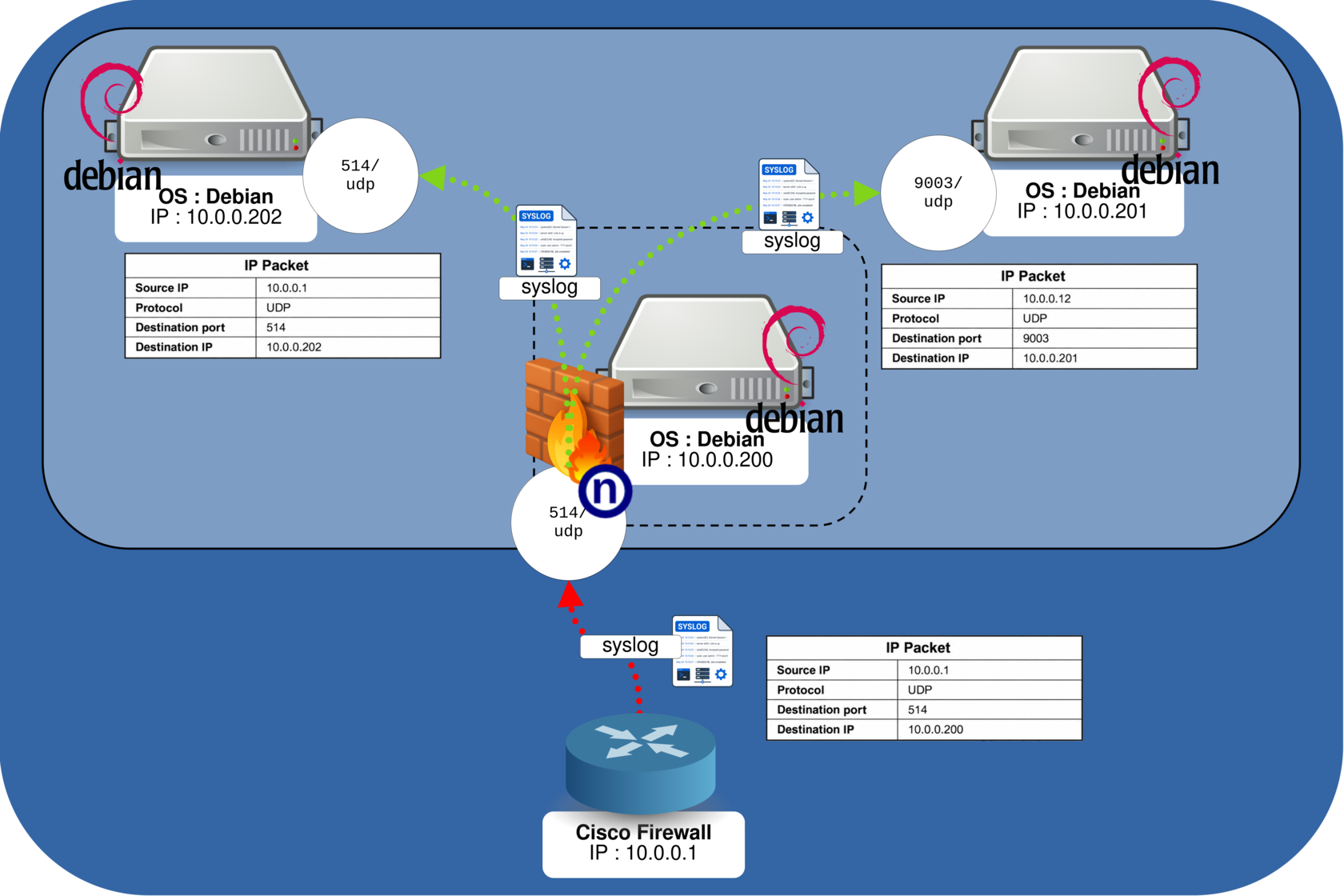
So there were not many options left other than asking our Linux friend for help. As we will see, I added a Debian server to the network to act as an intermediary Syslog host. After configuring the firewall to send its Syslog traffic to this Debian server, nftables will duplicate the incoming packets and forward copies to two different Syslog servers.
I was largely inspired by the solution posted by A.B on superuser.com, so thanks to him!
Let's now see how to do it!
Network Diagram
As we can see in this diagram, the firewall sends its Syslog messages to the 10.0.0.200 Debian server. nftables will allow us to duplicate these packets and also modify their IP and UDP headers if needed. We will first duplicate the packets and send them to 10.0.0.202 without changing the source IP address or the UDP destination port. We will also send another copy to the 10.0.0.201 host, but this time we will change the source IP address and the destination UDP port to 9003 — just for fun, and also to see how it can be done 😉.
Configure nftables Rules
We will edit the /etc/nftables.conf file and add a prerouting ruleset. The incoming Syslog packets will be intercepted before the routing decision, duplicated with the dup statement, and sent to our two destination servers.
#!/usr/bin/nft -f

flush ruleset

# Variable definitions
## Syslog proxy
define DST0 = 10.0.0.200

## Destination Syslog servers
define DST1 = 10.0.0.202
define DST2 = 10.0.0.201

## Network interface
define INT = "ens18"

# Filter table: everything is allowed by default
table inet filter {
        chain input {
                type filter hook input priority filter;
        }

        chain forward {
                type filter hook forward priority filter;
        }

        chain output {
                type filter hook output priority filter;
        }
}

# Table used to duplicate Syslog packets
table ip multiply {

        chain c {
                # Process incoming packets before the routing decision
                type filter hook prerouting priority -300; policy accept;

                # Syslog packets sent to the proxy (10.0.0.200:514)
                # are redirected to the cmultiply chain
                iifname $INT ip daddr $DST0 udp dport 514 counter goto cmultiply
        }

        chain cmultiply {
                # Duplicate and modify the Syslog packets
                jump cdnatdup

                # Drop the original packet after the copies have been created
                counter drop
        }

        chain cdnatdup {
                # First copy: 10.0.0.202:514
                # Change only the destination IP address.
                # The original source IP address and UDP destination port remain unchanged.
                ip daddr set $DST1 dup to $DST1 device $INT counter

                # Second copy: 10.0.0.201:9003
                # Change the source IP address from 10.0.0.1 to 10.0.0.12.
                ip saddr 10.0.0.1 ip saddr set 10.0.0.12 counter

                # Change the destination IP address and UDP destination port,
                # then duplicate the resulting packet.
                ip daddr set $DST2 udp dport set 9003 dup to $DST2 device $INT counter
        }
}- Next, apply the configuration:
root@10.0.0.200:~# nft -f /etc/nftables.confVerification
Now that our nftables rules have been applied, it is time to check that everything is working as expected.
- From the proxy host (
10.0.0.200), we can first verify that the rules are correctly loaded and monitor the packet counters. Press Ctrl+C to stop:
root@10.0.0.200:~# watch nft -a list ruleset- Install
tcpdumpon hosts10.0.0.201and10.0.0.202:
root@10.0.0.201:~# apt update && apt install tcpdump -y- Run
tcpdumpon each host using the appropriate UDP port:
root@10.0.0.201:~# tcpdump -nA -i ens18 udp port 9003root@10.0.0.202:~# tcpdump -nA -i ens18 udp port 514- If the firewall is not configured yet, you can simulate a Syslog message with the
loggercommand:
root@host:~# logger -n 10.0.0.200 -P 514 -d "std.rocks"- In the
tcpdumpoutput, you should see the duplicated Syslog messages appear:
root@10.0.0.201:~# tcpdump -nA -i ens18 udp port 9003
listening on ens18, link-type EN10MB (Ethernet), snapshot length 262144 bytes
20:56:00.089029 IP 10.0.0.12.62522 > 10.0.0.201.9003: SYSLOG user.notice, length: 125
E.....@.=......d.....:......<13>1 2026-09-20T20:56:00.086533+02:00 std.rocks john - - [timeQuality tzKnown="1" isSynced="1" syncAccuracy="968000"] std.rocks- On
10.0.0.202, the packet keeps the original source IP address and UDP destination port:
IP 10.0.0.1.62522 > 10.0.0.202.514: SYSLOG user.notice, length: 125
...- On
10.0.0.201, the source IP address has been changed to10.0.0.12and the UDP destination port to9003:
IP 10.0.0.12.62522 > 10.0.0.201.9003: SYSLOG user.notice, length: 125
...